
IMPORTING AN EMAIL
Available in most activities in the CASI system
Adds any selected email from your Outlook system to the open activity. It also includes any attachments the email may have
Important
There is a subtle but important difference to understand between the ability to import an email into any activity and the actual Email (Import) activity itself
The Email (Import) activity is used to record an actual email when the email is the subject matter by itself ie the email does not really ‘belong’ to another activity
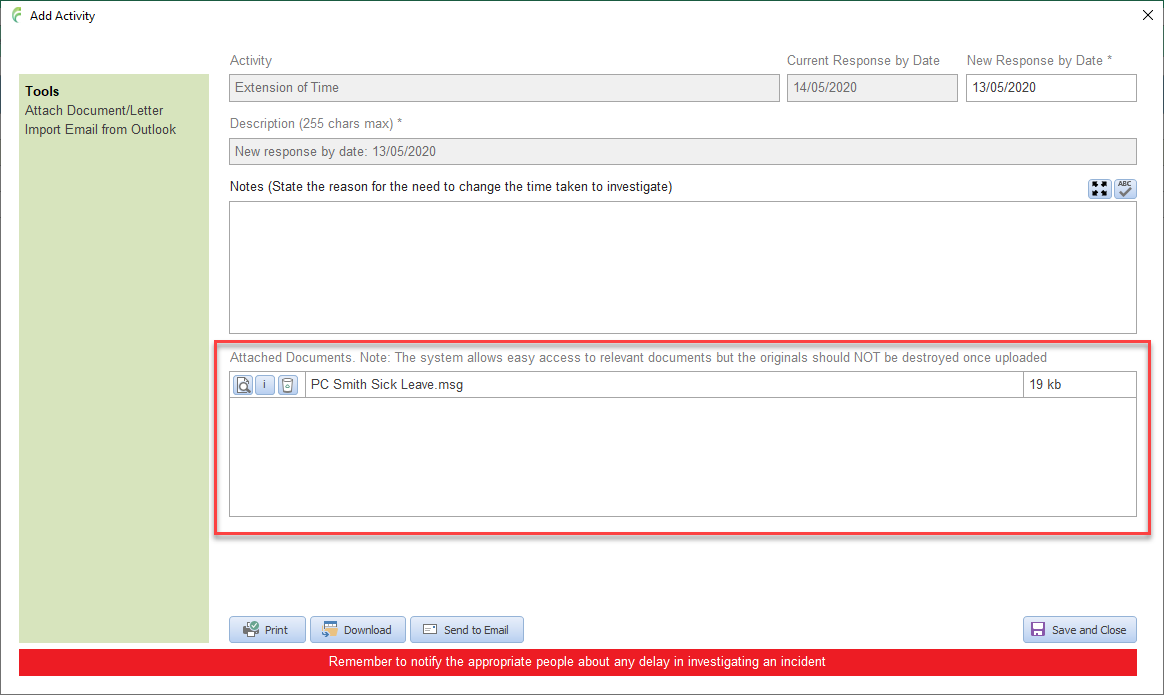
When the email belongs to, or forms part of, another activity type, for example supporting information to the reason for an extension of time, then the email should be imported into that activity
In Outlook, locate the email you want to import. It can be in any inbox, folder etc
Click on the email to select it (you only want it selected, not open)

In the activity window that you want the email attached, click Import Email from Outlook and confirm that you have the email selected

The imported email will appear in the Attached documents list
Documents can be reviewed by clicking the Open Document button – a read only copy will be opened
Documents can be deleted from the list by clicking the Delete Document button