

SETTING THE INVESTIGATING OFFICER
When an incident is added to the system, the person adding it, is automatically set as the investigating officer (currently assigned to).
When the home that an incident relates to is changed, the person making the home change is asigned as the investigating officer (if not already)
To manually change who the incident is assigned to
Open the required incident and click the General tab in the Incident management window
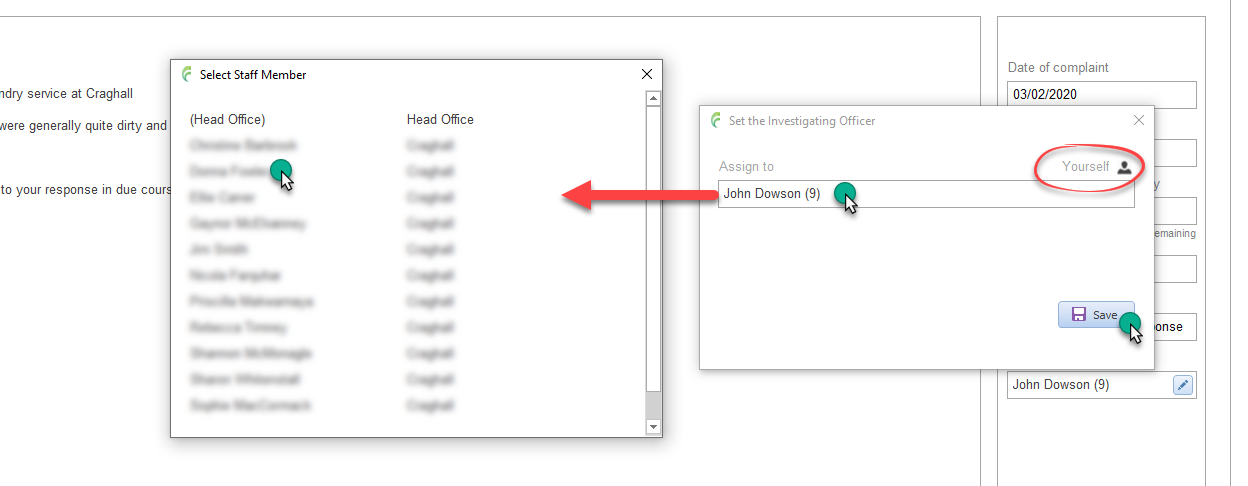
Click the pencil edit button next to Currently assigned to, to open the Set the investigating officer window

To quickly asign the incident to yourself, click the Yourself icon
To asign the incident to another member of staff or to Head Office (*), click in the Assigned to box to open the Select staff member list and select the appropriate person
Click save.
(*) Assigning an incident to Head Office notifies Head Office management that an incident requires assigning. They will then assign the incident to an appropriate staff member